Water polo
Water polo stats and game film for clubs and teams
SnapStats tracks water polo stats and links each one to the game film. Built for coaches, club directors and the parents of youth players, for one team or a club with several.
The Free plan costs nothing and needs no credit card. Built for water polo first; also set up for basketball, lacrosse, soccer, volleyball and more. See everything it does.
Built for water polo coaches and club directors
One login per person, with a role that decides what they see: club admins, coaches, players and parents.
For a coach with one team
Track the game from the deck, then open any stat in the Film Room to see the play. The Free and Team plans each cover one team.
For a club director
One club with each team inside it. The Program plan covers up to four teams, and more can be added at $10 a month each.
For parents
Follow your own child: the schedule, the live stream on game day, and afterwards your player's stat line with the clips attached.
See the play behind the stat
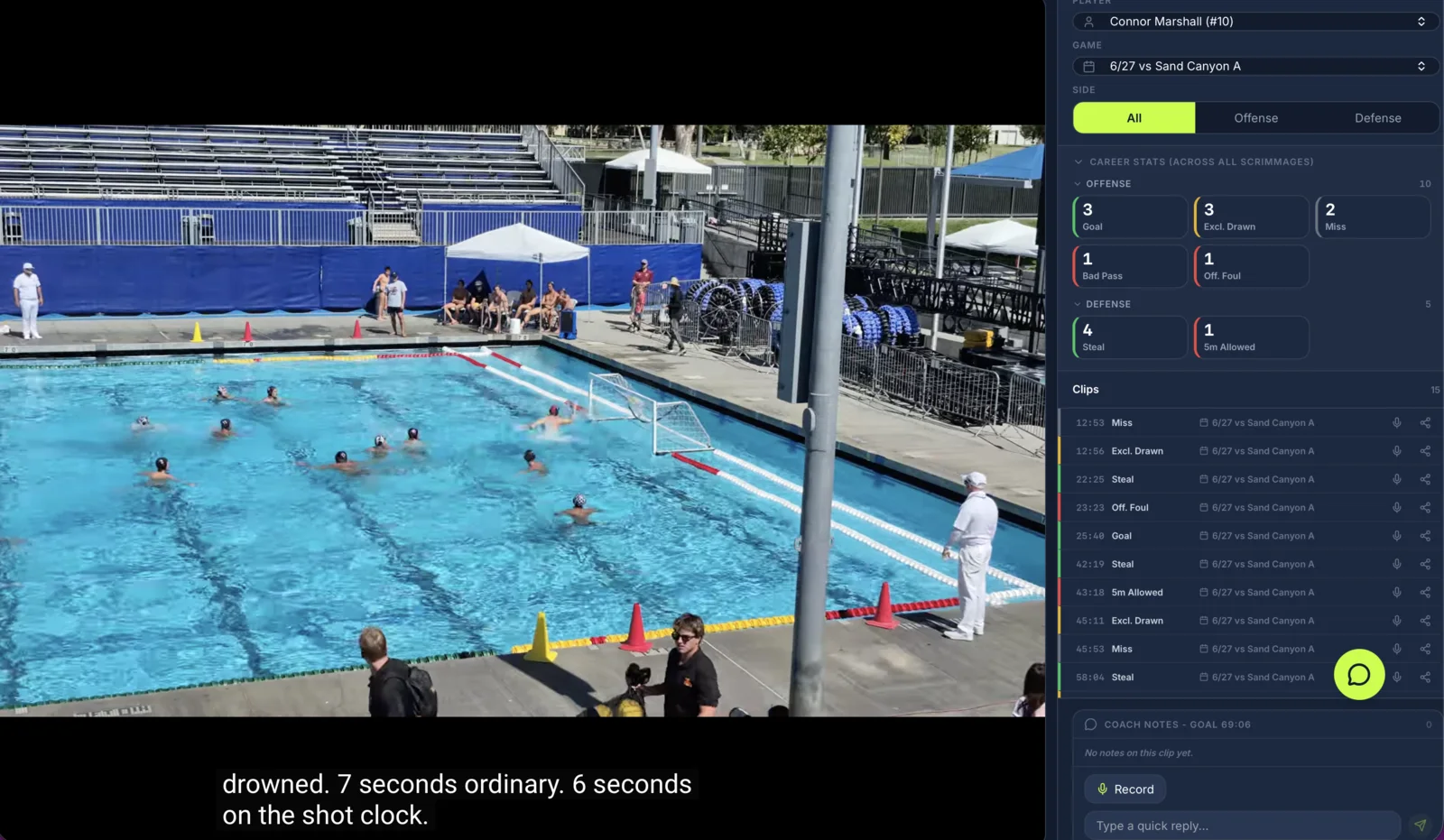
Every stat tagged during a game is stored with a timestamp in the video. In the Film Room, open a tagged stat and the film jumps to that moment. A player's stat line is also a list of their clips.
Which water polo stats can I track?
These are the water polo events SnapStats records. Each one is tagged to a player, a quarter and the possession context it happened in.
Scoring
- Goals
- Including a goalkeeper full court goal.
- Assists
- Credited to the player who made the pass.
- Shots
- Each shot is logged as a goal, saved, blocked or wide, which gives shooting percentage.
- Man-up conversion
- Goals on 6 on 5 against man-up possessions.
Possession
- Steals
- Possession won back.
- Turnovers
- Bad pass, stolen, and shot-clock violations, recorded separately.
- Sprints
- Won or lost at the start of each quarter.
Exclusions and penalties
- Exclusions drawn
- The exclusion your player earned.
- Exclusions committed
- The exclusion called against your player.
- 5 metres drawn and allowed
- Penalty shots earned, and penalty shots given up.
Defense and goalkeeping
- Blocks
- Field blocks, separate from goalkeeper saves.
- Tips
- Recorded separately from blocks.
- Goalie saves
- Saves, with save percentage.
Possession context
A goal on 6 on 5 and a goal on a counter attack are not the same goal. The context is saved with the stat, so man-up conversion is a number rather than a feeling.
Positions and game structure
Players are assigned one of the seven pool positions, and the game runs as four quarters of seven minutes plus overtime.
Use SnapStats for a team or a whole club
On the Free and Team plans a club has one team. On the Program plan a club has up to four teams, with more at $10 a month each. Either way, each person has one login and a role.
Club admins
Set up the season once. Add teams, assign coaches, move a player between squads, and handle billing in the same place.
Coaches
Track stats during the game, review the film afterwards, and pull the clips of one player together when a college asks for them.
Players
RSVP for the session, then watch their own stat line and their own clips.
Parents
Follow their own child: the schedule, the live stream, and afterwards the stats and clips for their player.
How do I stream my first game?
- Connect your club's YouTube channel to the team in SnapStats. You do this once per team.
- Create the game, then open Broadcast Setup on the web app to set the announcer, any sponsors and guest invites.
- On game day, start the stream from the SnapStats phone app. The video goes to your YouTube channel, and SnapStats lays the score over it when viewers open the broadcast link.
- Share the link. Viewers tap it and watch. No login, and it is free to watch.
- When the stream ends, YouTube saves the recording as an unlisted video and SnapStats links it into the Film Room, with every tagged stat aligned to the video.
The full walkthrough, including the phone settings that keep a stream alive, is in the streaming guide.
How do I get started, and what does it cost?
Create an account, and a three-step setup creates your club and first team. The Free plan costs nothing: there is no trial period and no credit card to enter. If you would rather have our team set the club up, the assisted intake collects what we need and we provision it for you. Questions go to hello@snapstats.app.
Free
Get started with basic stat tracking
- Unlimited games
- Video film sync
- Goals and assists tracking
- Game scheduling and RSVP
- 1 team, 1 stat tracker
Team
All the tools for one team
- Everything in Free
- All stat types
- Unlimited stat trackers
- Playbook with play execution tracking
- Live stream embedding
- Analytics dashboards
- CSV and PDF export
- Player profiles with recruiting features
- Season comparison
- Homework assignments
- Consensus engine
- Parent portal
- Team announcements
- Team messaging
- AI game recaps
- AI scouting reports
Program
For programs with multiple teams
- Everything in Team
- Up to 4 teams included
- Additional teams +$10/mo each
- Unlimited sports
- Program-level analytics
- Priority support
Fair questions
Do we have to stat the game live?
Most clubs do, because live tracking is what puts the score on the stream and the stat line in front of parents the same day. If nobody was free to track, the recording still lands in the Film Room after the game, so the film is there to review either way.
How are the stats tied to the video?
Each stat is recorded with a timestamp in the game video. Open a tagged stat in the Film Room and the video jumps to that moment, so a stat line is also a list of clips. Pull every clip of one player together to build a reel without scrubbing through four quarters.
We run several teams, from 12U to 18U. Is that one account or several?
One club, with each team inside it. The Program plan covers up to four teams under one club, and more teams can be added at $10 a month each. Rosters, schedules, coaches and parents sit under the club, so an admin sets up a season once rather than once per team. Roles decide who sees and does what.
What do parents actually get?
They follow their own child. The schedule and RSVP, the live stream when the game is on, and afterwards their player’s stat line with the clips attached. Watching the stream is free and needs no login.
Does it understand water polo, or is it a generic tracker with the labels changed?
The sport is configured as water polo: four quarters of seven minutes plus overtime, the seven pool positions, and possession context for even, man up, man down, counter attack and 5 metre. Exclusions drawn and committed, and 5 metres drawn and allowed, are tracked as their own events.
Set up your team before the first game
Create the club and roster, stream the game, and track it. Afterwards, open a stat and watch the play.